Release 1
You always see where you are
Domain, DC, connection type, identity per DC, functional levels and operations masters in one banner. Production and test have their own colours, so nobody works in the wrong forest.
DirectoryOps · The ADUC replacement for Windows
Active Directory the way it should be in 2026: a modern Windows console that replaces ADUC (dsa.msc). You always see which domain and which DC you are working on, find objects even in large directories and read attributes the way humans read them. No servers, no agents, no cloud lock-in.
In three steps
Anyone who runs AD wants to know three things for sure: where they are working, where the object lives and what its values mean. That is exactly what Release 1 is built for.
You pick the domain and domain controller yourself, from the directory's DC list with site and operating system. The banner always shows where you are: production or test in its own colour, identity per DC, READ ONLY. No silent DC switch.
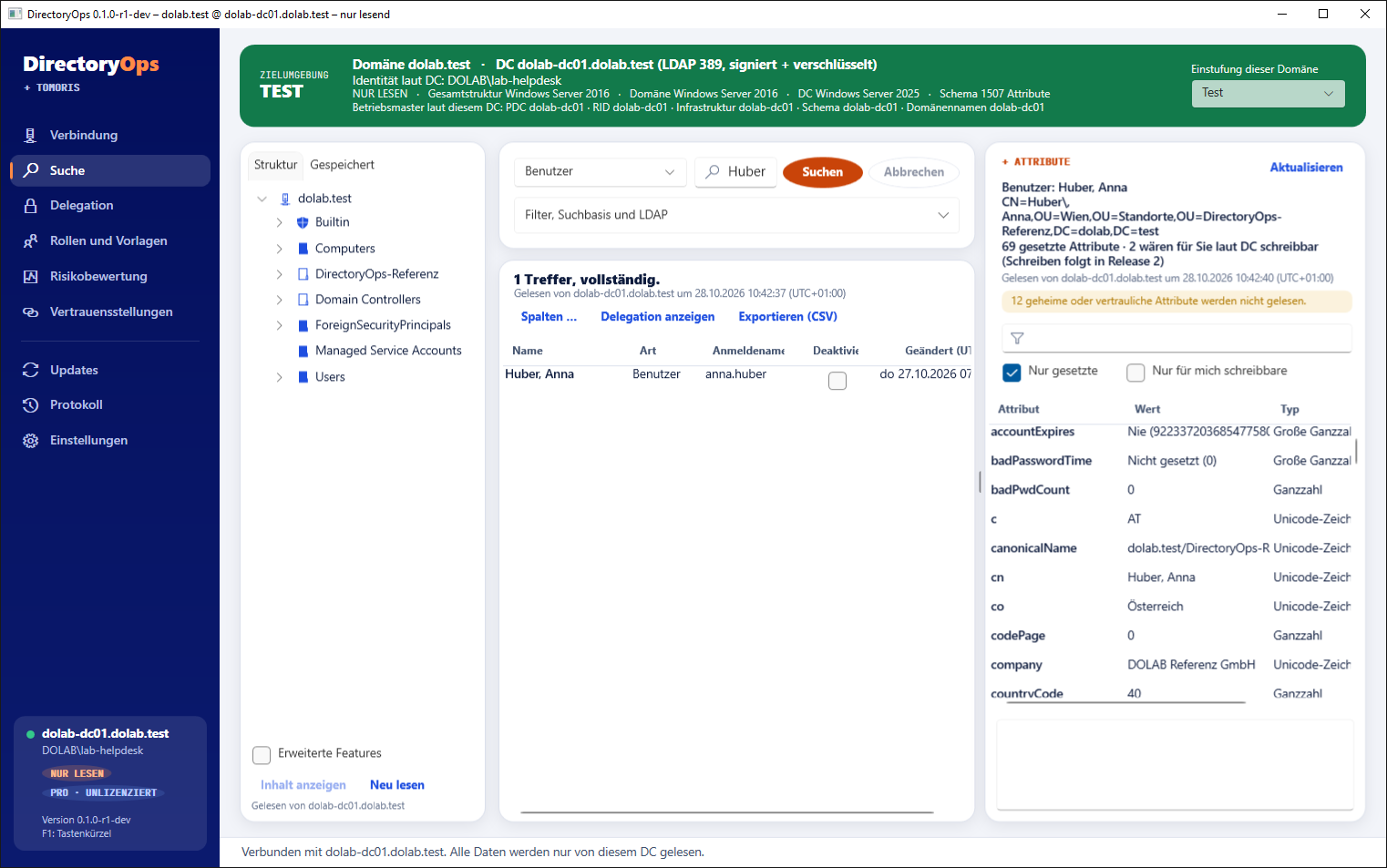
Free text, search base, filters or your own LDAP filter. Large directories load page by page and can be cancelled, incomplete results are marked. Plus saved searches, favourites and CSV export.
One click on a result opens its attributes: times as dates, flags as words, SIDs readable, multi-valued attributes complete. Whether you may change an attribute is decided by the DC, not guessed by the console.
Proven, not promised
Everything in this section runs in the current version against real domains. What is still in progress is listed further down, separately and clearly marked.
Domain, DC, connection type, identity per DC, functional levels and operations masters in one banner. Production and test have their own colours, so nobody works in the wrong forest.
The console never queries password, LAPS, BitLocker or any attribute the schema marks as confidential. What is never loaded cannot be shown, exported or logged.
100,000+
Paging, cancel and a result cap with a notice. Saved searches, favourites by objectGUID that survive moves, and CSV export.
Straight from the search result, with schema hints and “writable for you” according to the DC.
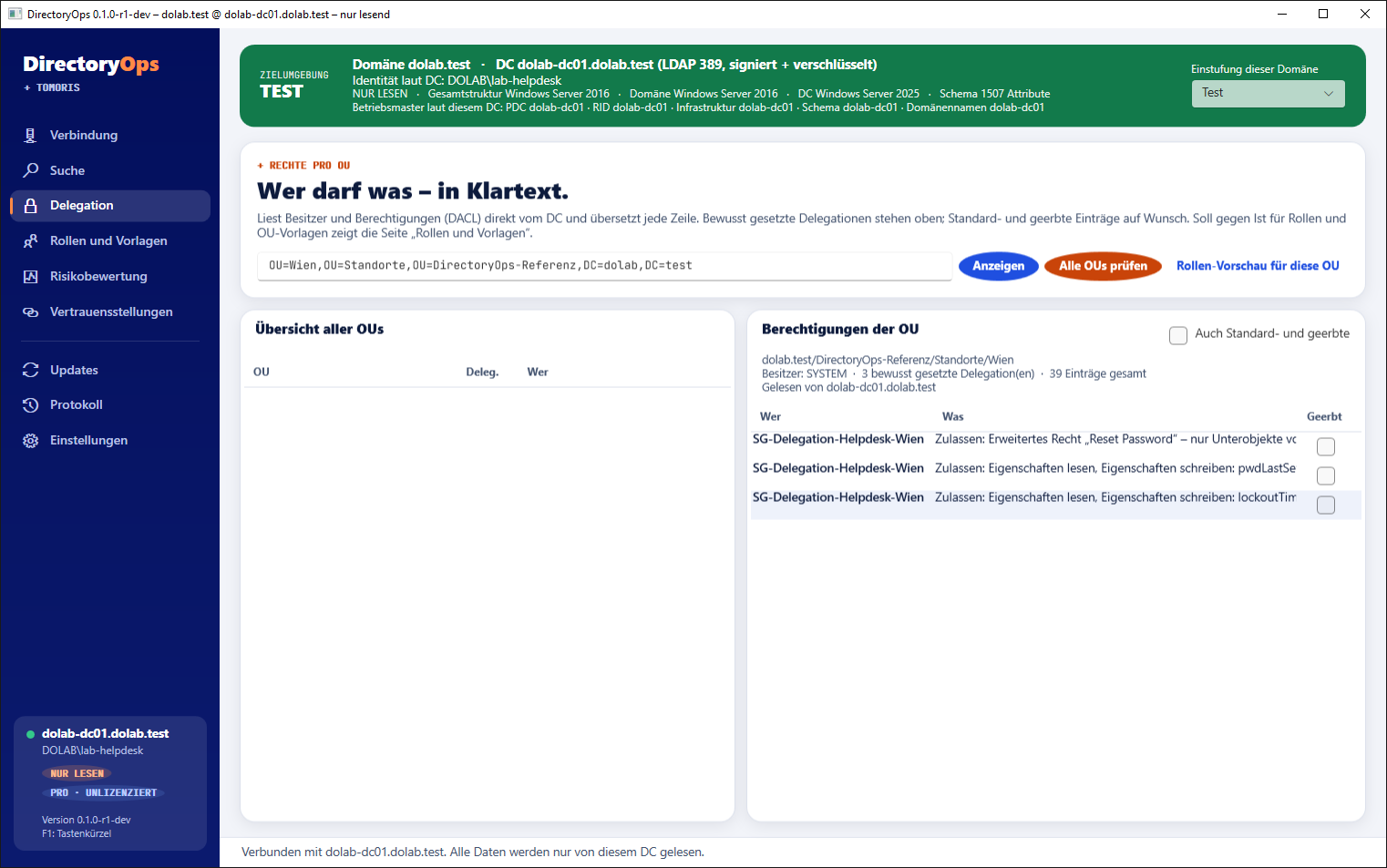
Per OU: who may do what, set directly or inherited. No dsacls, no puzzling over GUIDs.
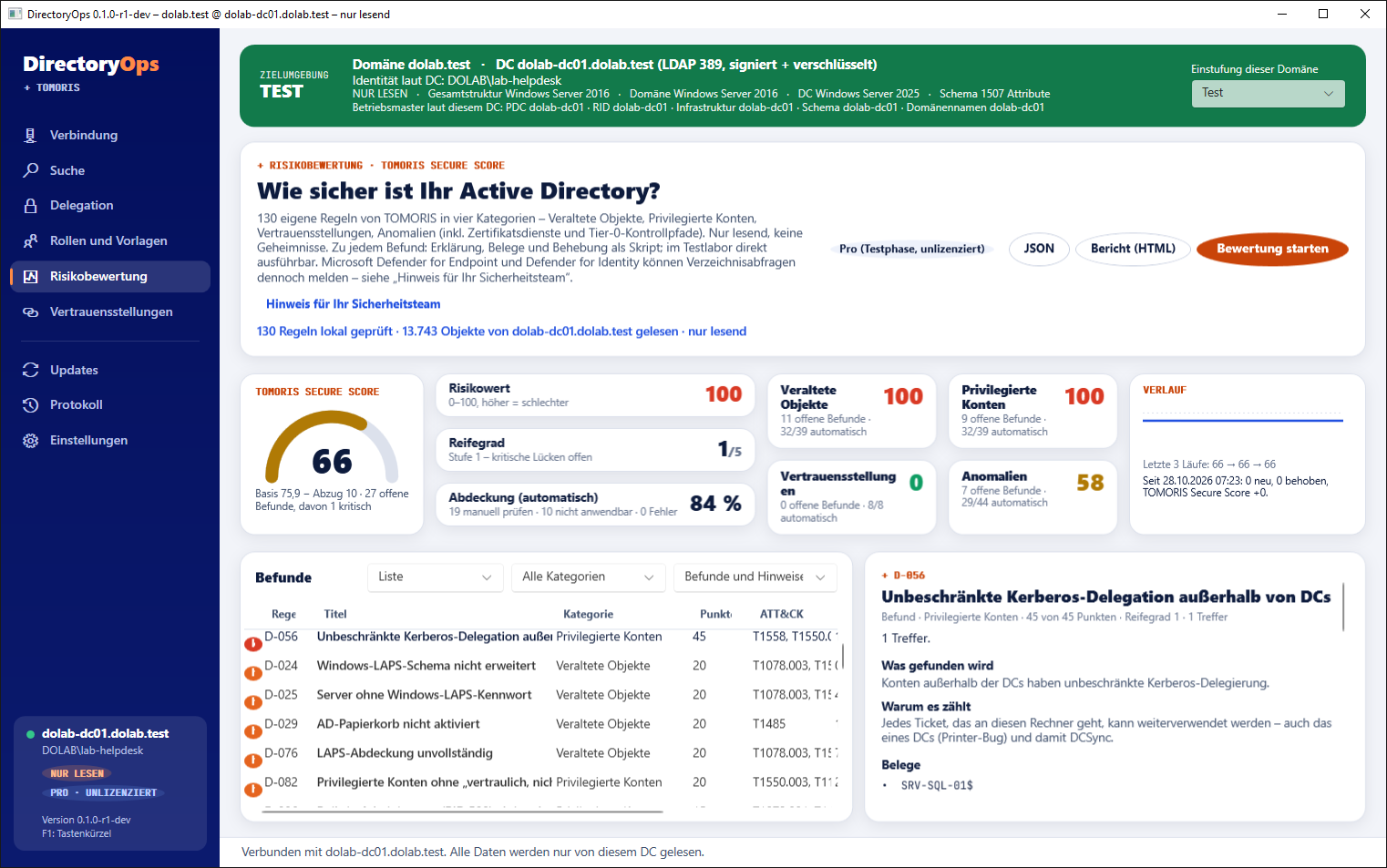
Checks at the push of a button, with explanation, recommendation and test method per finding, in plain language.
Automatic, from an internal share or fully offline. Controllable by Group Policy; the signature is verified before every installation.
DirectoryOps uses the rights of the signed-in account. No service account with full access, no server holding all the rights, no local admin rights on the workstation.
What it looks like
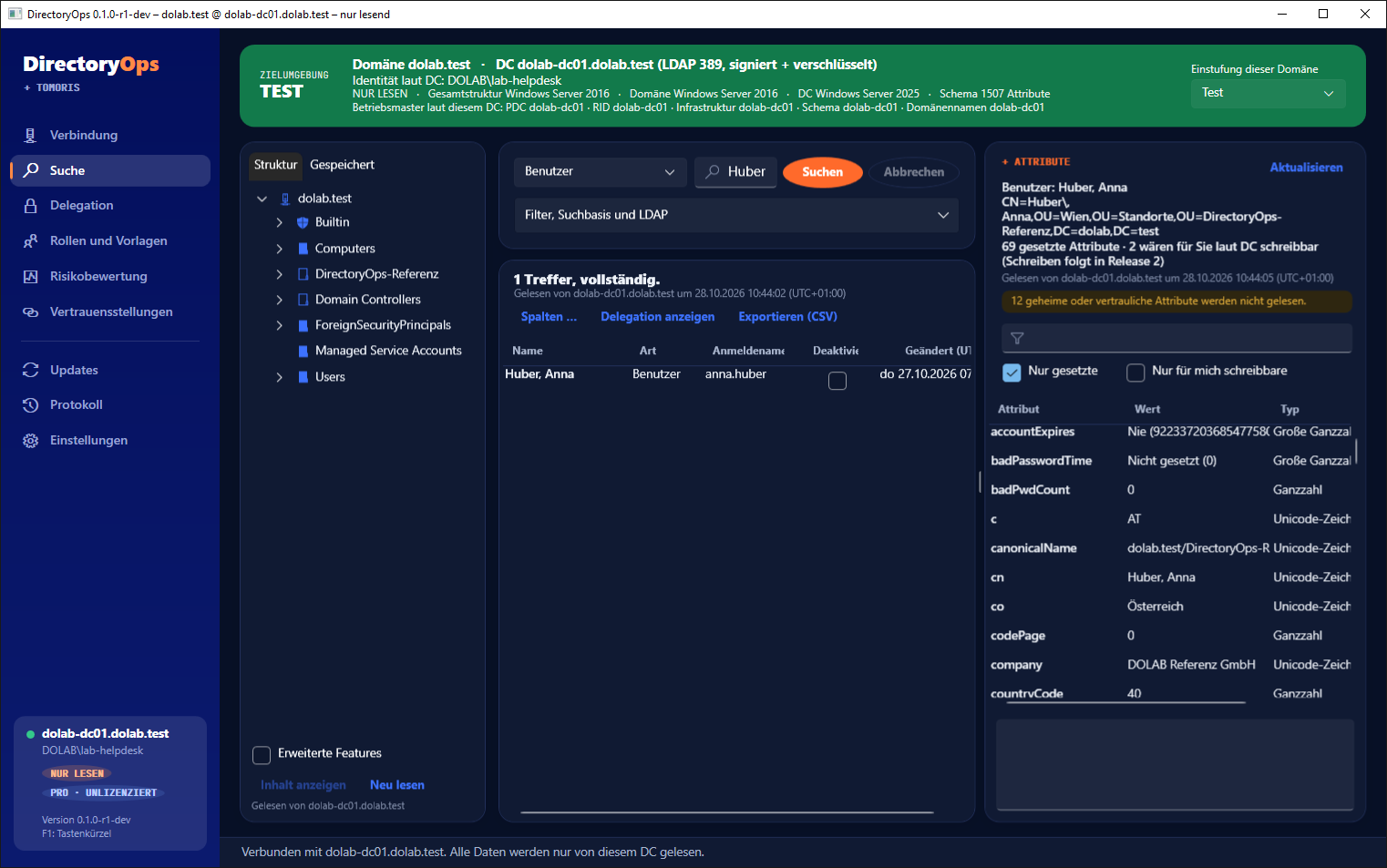
Light or dark, just like your Windows. Search on the left, attributes on the right, the target always on top.
What goes where
DirectoryOps is a Windows application, not a service. LDAP runs between console and domain controller, signed and encrypted. Almost nothing goes outside, and that little can be switched off.
In progress
Honestly separated: these features are in progress. What belongs to Release 1 is marked as such. We announce dates once they are fixed.
An overall score for your AD, a score per category and every finding with its reasoning. Remediation straight from the console, with preview and undo. Learn more
Every change shows beforehand what changes where. Plus bulk changes with preview instead of scripts.
Roles like “Helpdesk site Wien” instead of dsacls and the delegation wizard. The console shows the entries before they are set.
Create new sites and tier structures from templates, with matching delegation included.
Group memberships with an expiry time, for example admin rights that end on their own after an hour.
Create group managed service accounts step by step, with prerequisite checks.
The second console: compare, version, search and report on Group Policy. More about PolicyOps
Who it is for
IT departments, helpdesks and service providers in the DACH region who work in Active Directory every day and never want to make a change in the wrong forest.
No more guessing which DC is answering. And no attribute editor that writes LAPS passwords into your export.
With READ ONLY and their own narrowly scoped rights. No Domain Admin account, no fear of the wrong click.
The target banner shows in colour which customer you are working on. Licensed per tenant and month, reported offline.
Pricing
No price per admin, because good delegation should not cost extra. Community is free and stays free.
Everything read-only plus a full risk assessment with remediation scripts, for your own organisation.
Freeforever, no time limit
For your own organisation only, no commercial use at customers. Lab licences for test and training forests are free as well.
Annual subscription, unlimited admins, tiered by enabled, non-expired user accounts.
On requestper forest and year · plus VAT
| Tier | per year |
|---|---|
| Sup to 250 | On request |
| Mup to 1,000 | On request |
| Lup to 3,000 | On request |
| XLup to 10,000 | On request |
| XXLover 10,000 | Quote |
Introductory price until general availability, locked in for 3 years. Try Pro free for 30 days, offline via licence file; afterwards you fall back to Community, with no lock-out and no data loss.
Pro scope for customer forests, billed monthly, from 5 tenants.
On requestper tenant and month · plus VAT
| Tier | per month |
|---|---|
| Sup to 250 | On request |
| Mup to 1,000 | On request |
| Lup to 3,000 | On request |
| XLover 3,000 | Quote |
For service providers who use DirectoryOps as part of their service to customers. One tier per booking; tenants of different sizes on request.
Prices on request via Contact. All prices net, plus VAT. Pro and Consultant are annual subscriptions, MSP is monthly. Pro applies per forest, with all domains and unlimited admins; we count enabled, non-expired user accounts. Anything the overview does not list (Pro above 10,000 accounts, MSP above 3,000 accounts per tenant, tenants of different sizes, purchase instead of subscription, bundle with PolicyOps) is available on request.
All prices, consultant licence and comparison
Licence
Because good delegation should not be penalised. If you give your helpdesk its own narrowly scoped rights instead of sharing one admin account, you should not pay more for it. The licence is bound to the forest and checked offline.
If you buy Pro before general availability, you pay the introductory price in every tier instead of the later list price. That price is locked in for three years. Current amounts are shown in the overview above.
No, Community is for your own organisation. For assessments at customers there is the consultant licence or the Assessment Pass; for ongoing operations at customers, the MSP model.
Yes, on request with a separate quote: a perpetual right to use the purchased version with a maintenance contract. Without maintenance the purchased version keeps working, just without updates.
Yes. Companies and public-sector customers get a quote on request and buy on invoice.
The console falls back to Community. Reading keeps working, nothing is locked, and saved searches and settings are kept.
Yes, as soon as PolicyOps is available we will also offer DirectoryOps and PolicyOps as a bundle. The bundle price is available on request.
Honestly
No. DirectoryOps works with the rights of the signed-in account. The domain controller decides what you may see and change, and the console shows you.
Only the console on the admin workstation. The package ships with .NET, needs no local administrator rights to work, and nothing on the domain controllers.
Console: current versions of Windows 11 and Windows Server 2019 to 2025 (x64). Domain controllers: Windows Server 2016 to 2025.
Yes. The licence is checked offline via a file, and updates can come from an internal share or as a file.
That is what PolicyOps is for: a dedicated console for GPOs, cheaper in a bundle with DirectoryOps. More about PolicyOps
Community is free with no time limit. Try Pro free for 30 days, offline via licence file.
We would like to use Google Analytics to measure which pages help and whether downloads and trial licences arrive. With advertising measurement we also count which ad brought you here (click ID). Without consent nothing loads from Google. Privacy